
Wordle #
In this lab, you will be introduced to computational thinking and develop the code for a game based on the NYT Wordle.

Syllabus Topics [SL] #
- B1.1.1 Construct a problem specification.
- B1.1.2 Describe the fundamental concepts of computational thinking.
- B1.1.3 Explain how applying computational thinking to fundamental concepts is used to approach and solve problems in computer science.
- B1.1.4 Trace flowcharts for a range of programming algorithms.
Syllabus Topics [HL] #
- B4.1.1 Explain the core principles of ADTs
[0] Set up #
💻 Go to your
dpcs/unit00_strings folder.
cd ~/desktop/dpcs/unit00_strings/
git clone https://github.com/isf-dp-cs/lab_wordle_yourGithubUsername
💻 In the Terminal, type the following command to open the lab folder.Below you’ll see that the
git clonecommand has ayourGithubUsername.You need to replace this with your username
e.g.
https://github.com/isf-dp-cs/lab_wordle_emmaqbrown
cd lab_wordle_yourGithubUsername
💻 Enter the Poetry Shell to start the lab. As a reminder, we will run this command at the start of each lab, but only when we are inside a lab folder.
poetry shell
👾 💬 Exiting the poetry shellWhen you want to exit the shell, you can type
exitor^D
[1] Problem Specification #
The Problem Specification is where you outline the description of your problem and how the product will address it. This includes the:
- problem scenario: description of problem
- success criteria: measurable outcomes of the solution requirement
📖 Read this story to consider the problem specification for Wordle.
[2] System Overview: Flow Chart #
✏️ Sketch a flowchart for the Wordle gameplay. Ensure it completes each success criteria and utilizes the correct symbols.
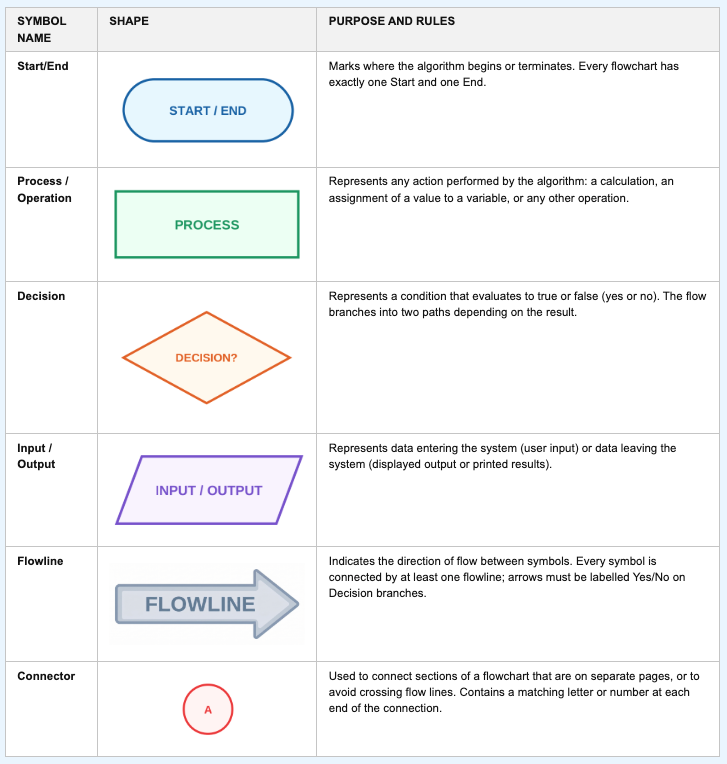
Source: Inthinking eBook
[3] Criteria D: Development #
Development is where you actually create the product. You must justify your Success Criteria and demonstrate your ability to pass the tests outlined in the Testing Strategy.
👾 💬💻 Construct code to complete each success criteria.
- Each time the user plays the game, the solution word is chosen randomly from a list of words
- User can input their five letter guess and is limited to six attempts
- When the user has exceeded six guesses, the game will end and output the solution word
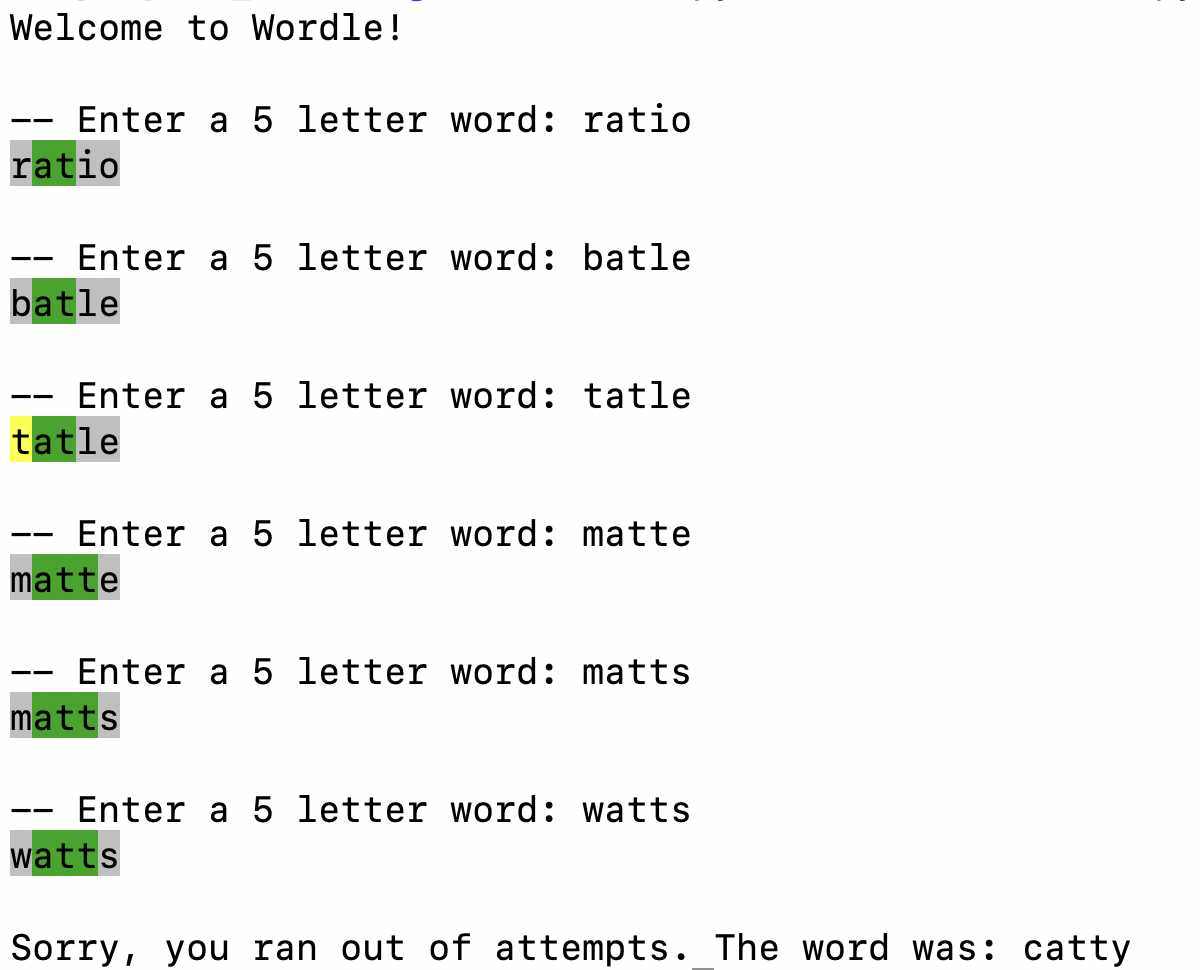
- After the user guesses, their guess will output with color formatting to display if each letter is correct, incorrect, or in the incorrect position.
- Error handling ensures the user inputs a guess of the correct length and contains only letters
Color Feedback #
A big part of Wordle is the feedback from the game. After each guess, the user is shown their guess, and each letter is highlighted according to these rules:
- GRAY backround: incorrect letter not included in the word
- YELLOW backround: correct letter in the wrong position
- GREEN backround: correct letter in the correct location
Here are some ANSI codes for you to use. They are also in the worldle.py file:
String gray = "\u001b[47;1m";
String yellow = "\u001b[43;1m";
String green = "\u001b[42;1m";
String reset = "\u001b[0m";
Example Completed Game
⚡✨ Once you complete the lab, be sure to complete these two steps:✏️ Go to your Syllabus Content Checklist in your Google Drive and update it accordingly.
💻 Push your work to Github
- git status
- git add -A
- git status
- git commit -m "describe your code here"
- git push
- git remote
[5] HL: Abstract Data Types (ADTs) #
Sets #
Wouldn’t it be great if we had a Wordle helper program that could give a list of the possible words every round?
A Set is perfect for this situation.
💻 In the file word_finder.py, finish the function get_possible_words().
- inputs: a string of good letters, a string of bad letters, and a list of five letter words
- output: a list of possible words
It uses sys to access command line arguements to easily run the program from the Terminal. The first arguement represents good letters (letters in the word) and the second arguement represents bad letters (letters not in the word). Here is how to run the file.
$ python word_finder.py rog asefn
['glory', 'gourd', 'groom', 'group', 'grout', 'growl', 'rigor', 'rough']
Consider which Set operations to use. Take a look this resources for how to use a Set in Python.
union- join two setsintersection- find common valuesdifference- only items from first setsubset- if all of items in first set are in second setsuperset- if all items of the items in the second set are in the first set
👾 Test your word_finder.py with the real
Wordle! Consider, how you could rank the possible words in best to worst?
⚡✨💻 Push your code to GitHub!