
Encryption #
In this lab you will continue to practice functions and are introduced to encryption.
Syllabus Topics [SL] #
- B2.1.3 Describe how programs use common exception handling techniques.
- B2.5.1 Construct code to perform file-processing operations.
- A2.4.4 Describe the process of encryption and digital certificates.
Key Vocabulary #
| Word | Definition |
|---|---|
| Encryption | Converting plain text into a secure format, cipher text, that cannot be easily understood by unauthorized people. |
| Encryption Key | A string of characters or numbers used by an encryption algorithm to encode or decode data. |
| Symmetric Cryptography | The same key is used to encrypt and decrypt data |
| Asymmetric Cryptography | The public key is used to encrypt and the private key is used to decrypt data |
| Exception | An event that interrupts the execution of a program |
[0] Set up #
💻 Go to your
dpcs/unit01_cryptography folder.
cd ~/desktop/dpcs/unit01_cryptography/
💻 Clone your repo and go into the directory.
Be sure to replace yourGithubUsername with your actual username.
git clone https://github.com/isf-dp-cs/lab_encryption_yourGithubUsername
cd lab_encryption_yourGithubUsername
💻 Enter the Poetry Shell to start the lab. As a reminder, we will run this command at the start of each lab, but only when we are inside a lab folder.
poetry shell
👾 💬 Exiting the poetry shellWhen you want to exit the shell, you can type
exitor^D
[1] Symmetric Cryptography #
Symmetric cryptography is when the same key is used to encrypt and decrypt the data.
Atbash Cipher #
The atbash cipher is a simple cipher where each letter in the alphabet is reversed. A = Z, B = Y, and so forth.
💻 In atbash_cipher.py, construct the function atbash() to encrypt or decrypt a message that has been encrypted by the atbash cipher.
Caesar Cipher #
The caesar cipher is a type of symmetric cryptography used by ancient Romans. It takes a message, the plain text and transforms it by shifting each letter by a set value, the encryption key.
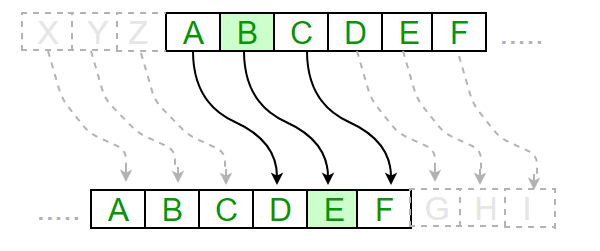
The plain text "beg" with the encryption key 3, becomes "ehj".
bshifts by 3, becomingeeshifts by 3, becominghgshifts by 3, becomingj
💻 In caesar_cipher.py, construct the function decrypt_caesar_cipher() to decrypt a message that has been encrypted by a caesar cipher.
💻 Test your decryption function decrypt_caesar_cipher() on words and short phrases.
💻 Use your decrypt_caesar_cipher() function and file handling methods to decrypt the message in caesar_encrypted_text.txt. You should then create a new file with the decrypted text.
✅ Check your work by opening the created file and ensuring it makes sense as English text. Do you recogonize the text?
👾 💬Incorporate exception handling into your program by ensuring it doesn’t crash if the file does not exist.
Be sure to include
try,except, andfinally.
[2] Deliverables #
⚡✨ Once you complete the lab, be sure to complete these two steps:✏️ Go to your Syllabus Content Checklist in your Google Drive and update it accordingly.
💻 Push your work to Github
- git status
- git add -A
- git status
- git commit -m "describe your code here"
- git push
- remote
[3] Extension: Vigenere Cipher #
The Vigenere cipher is another substitution cipher. It takes a message, the plain text and transforms it by shifting each letter by a set value according to a repeating encryption key. Unlike the caesar cipher, the encryption key is a string.

For example, imagine that encryption key is 'be'.
| b | e |
|---|---|
| 1 | 5 |
'b' is number 1 in the alphabet and 'e' is number 5.
Therefore, we will shift our letters by 1 and 5, in an alternating pattern. For example the plain text "apple" with the encryption key "be", becomes "buqpf".
| a->b | shift by 1 |
|---|---|
| p->u | shift by 5 |
| p->q | shift by 1 |
| l->q | shift by 5 |
| e->f | shift by 1 |
💻 In vigenere_cipher.py, construct the function decrypt_vigenere_cipher() to decrypt a message that has been encrypted by a vigenere cipher.
💻 Test your decryption function decrypt_vigenere_cipher() on words and short phrases
💻 Use your decrypt_vigenere_cipher() function and file handling methods to decrypt the message in "vigenere_encrypted_text.txt". The encryption key is the encryption key from the caesar_cipher problem written in English (e.g. 1 is one). You should then create a new file with the decrypted text.
✅ Check your work by opening the created file and ensuring it makes sense as English text. Do you recogonize the text?